Happy দুর্গা পূজা to U

durgapuja01_big.gif


Click here to View more...


The Rituals of Durga Puja

http://www.durga-puja.org/gifs/dp9.jpg


http://www.durga-puja.org/gifs/dp3.jpg

The Rituals of Durga Puja


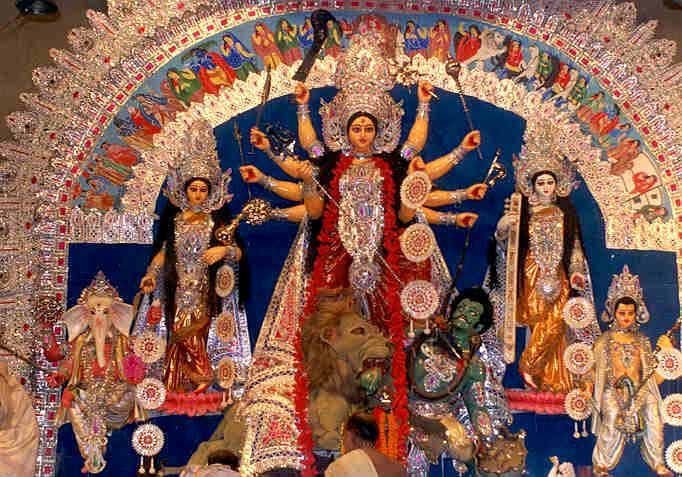
Durga Puja
Unveiling the face of the goddess Durga's idol.
The festival of Durga Puja starts with Mahalaya, the first phase of the waxing moon in Aswin. Thousands offer prayers to their ancestors at the city's river banks, a ritual called Tarpan. The inauguration of the Goddess idol starts on Mahashasthi. The main puja is for three days - Mahasaptami, Mahaastami, Mahanavami. The puja rituals are long and very detailed and complicated. Three days of Mantras and Shlokas and Arati and offerings - needs an expert priest to do this kind of Puja. Because of these facts, the number of Pujas held in the family has reduced and Durga Puja has mostly emerged as a community festival.

Mahashashthi
On this day Goddess Durga arrives to the mortal world from her heavenly abode, accompanied by her children. She is welcomed with much fanfare amidst the beats of dhak. Unveiling the face of the idol is the main ritual on this day. Kalaparambho, the ritual performed before the commencement of the puja precedes Bodhon, Amontron and Adibas.

Mahasaptami
Saptami is the first day of Durga puja. Kola Bow or Nabapatrika is given a pre-dawn bath. This is an ancient ritual of worshiping nine types of plants. They are together worshiped as a symbol of the goddess. The main Saptami Puja follows Kalparambho and Mahasnan.

Mahaastami
The day began with a recital of Sanskrit hymns in community puja pandals as thousands of devotees offered anjali to the goddess. Kumari Puja or the worship of little girls as the mother goddess was a special part of the rituals observed in a number of traditional and household pujas. As the day wore on, it was time for the important Sandhi Puja, which marks the inter-linking of the Maha Ashtami and Maha Navami.

Mahanavami
This is the concluding day of Durga Puja. The main Navami puja begins after the end of Sandhi Puja. The Navami Bhog is offered to the goddess. This is later partaken as prasad by the devotees.

Dashami
After the three days of Puja, in Dashami , in the last day, a tearful farewell is offered to the Goddess. Most of the community pujas postpone the farewell as long as possible and arrange a grand send-off. The images are carried in processions around the locality and finally is immersed in a nearby river or lake. Vijaya Dashami is an event celebrated all over the country.


Mythology of Durga Puja
According to Hindu mythology a demon named Mahishasura, earned the favor of Lord Shiva after a long and hard penance. Lord Shiva, impressed with his devotion, blessed him that no man or deity would be able to kill him and that only a woman can kill him. Mahishasur was very pleased with this boon as he thought that a woman can never defeat him. Arrogant Mahishasura started his reign of terror over the Universe and people were killed mercilessly. He even attacked the abode of the gods and conquered the heavens and became their leader.

The Defeat Of Gods
After their defeat and humiliation at the hands of Mahishasur, the gods took refuge under Lord Brahma, who took them to Lord Shiva and Lord Vishnu. The only solution left was the creation of a woman who possess the ultimate power to fight and defeat Mahishasur. Pure energy blazed forth from Brahma, Vishnu and Shiva - the trinity forming the pure energy of Godhood, all concentrating at one point that took the form of Goddess Durga.

Culmination Of Energies
Her face reflected the light of Shiva, her ten arms were from Lord Vishnu, her feet were from Lord Brahma, the tresses were formed from the light of Yama, the god of death and the two breasts were formed from the light of Somanath, the Moon God, the waist from the light of Indra, the king of gods, the legs and thighs from the light of Varun, the god of oceans and hips from the light of Bhoodev (Earth), the toes from the light of Surya (Sun God), fingers of the hand from the light of the Vasus, the children of Goddess river Ganga and nose from the light of Kuber, the keeper of wealth for the Gods. The teeth were formed from the light of Prajapati, the lord of creatures, the Triad of her eyes was born from the light of Agni, the Fire God, the eyebrows from the two Sandhyas,ie, sunrise and sunset, the ears from the light of Vayu, the god of Wind. Thus from the energy of these gods, as well as from many other gods, was formed the goddess Durga.

Power Of Weapons
The gods then gifted the goddess with their weapons and other divine objects to help her in her battle with the demon, Mahishasura. Lord Shiva gave her a trident while Lord Vishnu gave her a disc. Varuna, gave her a conch and noose, and Agni gave her a spear. From Vayu, she received arrows. Indra, gave her a thunderbolt, and the gift of his white-skinned elephant Airavata was a bell. From Yama, she received a sword and shield and from Vishwakarma (god of Architecture), an axe and armor. The god of mountains, Himavat gifted her with jewels and a lion to ride on. Durga was also given many other precious and magical gifts, new clothing, and a garland of immortal lotuses for her head and breasts.


The beautiful Durga, bedecked in jewels and golden armor and equipped with the fearsome weaponry of the gods, was ready to engage in battle with the fierce and cruel Mahishasura. Mahishasura and his demon allies found their attention drawn from heaven to Earth, as Durga's power moved its way towards heaven. Though confident of their power and control in heaven, the demons could not help being awestruck.

The Battlefield
As Mahishasura's armies were struck down effortlessly by Durga, it became obvious to him that he was not as secure in heaven as he had thought. No demon could fight her and win. Her breath would replenish her armies - bringing back to life all of her soldiers who fell. The demons were in chaos and were easily defeated and captured. Mahishasura was shocked and enraged by the disastrous events on the battlefield. He took on the form of a demonic buffalo, and charged at the divine soldiers of Durga, goring and killing many and lashing out with his whip-like tail. Durga's lion pounced on the demon-buffalo and engaged him in a battle. While he was thus engaged, Durga threw her noose around his neck.

Mahishasura then assumed the form of a lion and when Durga beheaded the lion, Mahishasura escaped in the form of a man who was immediately face to face with a volley of arrows from Durga. The demon escaped yet again and then having assumed the form of a huge elephant, battered Durga's lion with a tusk. With her sword Durga hacked the tusk into pieces.

The Victory
The demon reverted once more to the form of the wild buffalo. He hid himself in the mountains from where he hurled boulders at Durga with his horns. Durga drank the divine nectar, the gift of Kuber. She then pounced on Mahishasura, pushing him to the ground with her left leg. She grasped his head in one hand, pierced him with her sharp trident held in another, and with yet another of her ten hands she wielded her bright sword, beheading him. At last he fell dead, and the scattered surviving remnants of his once invincible army fled in terror.


Click here to View more...
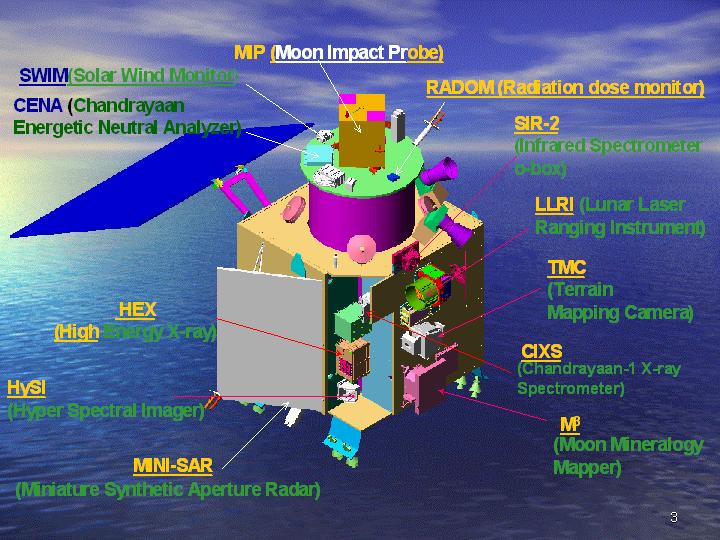
Heat strokes might have killed Chandrayaan-1

Chandrayaan-1 may have met premature death, but the mission has met 90 to 95% of its scientific objectives. Chandrayaan’s high-resolutions cameras have sent over 70,000 digital images of the lunar surface including pictures of mountains, craters, and the permanently shadowed area of Moon’s polar region.


The mission is abruptly ended but all the data was downloaded from the spacecraft on a regular basis and no scientific data is lost. John Yembrick, public affair officer (space operations) NASA headquarters, said, "NASA has obtained an abundance of data during our operations. Work is on to analyze that information."


The reason of termination of Chandrayaan-1 is now known that this was because of a miscalculation of the Moon’s temperature that had led to faulty protection.


Dr T K Alex, director, ISRO Satellite Centre, Bangalore, said, "We assumed that the temperature at 100km above the Moon’s surface would be around 75 degrees Celsius. However, it was more than 75 degrees and problems started to surface. We had to raise the orbit to 200km."


The average day temperature on the Moon’s surface is 107 degrees Celsius, while the mid night temperature is -153 degree Celsius.


On May 19, 2009 Chandrayaan-1’s orbit had raised to enable further studies on orbit perturbations, gravitational field variation of the Moon and also enable imaging of the lunar surface with a wider swath.


The heating problem on the craft had begun as early as November 25, 2008, forcing ISRO to deactivate some of the payloads - there were 11 in all. As a result, some of the experiments could not be carried out.


In early 2009, the situation improved and Chandrayaan-1 started operating normally. However, this time two star sensors got problem because of high temperature. These sensors were crucial in determining the orientation of the craft in space. The first star sensor packed up on April 26, and even the back-up sensor failed during the second week of May.


On August 29, 2009, ISRO lost radio contact of Chandrayaan-1. At the end, the mission was terminated on August 30, 2009 by the officials of ISRO.


Despite failure, Chandrayaan-1 has accomplished 95% result. Other countries are also satisfied with the result of mission Chandrayaan-1. The mission Chandryaan-1 is helpful for the Chandrayaan-2. Its strength and weakness is guidelines for Chandrayaan-2.


Click here to View more...

Chandrayaan-1 discovers water on moon

http://www.dancewithshadows.com/tech/wp-content/uploads/2008/10/chandrayaan-1-launch-2.jpg

Chandrayaan-1 has found proof of large amount of water on the surface of moon, according to reports.

Latest reports say that the data from the Chandrayaan-1 suggests water is still being formed on the moon.

"It's very satisfying," the report quoted Mylswamy Annadurai, the mission's project director at the Indian Space Research Organisation (ISRO).

The breakthrough would be announced by National Aeronautic Space Agency (NASA) today.

NASA's website says it will hold a media briefing at 1440 EDT on September 24 to "reveal new scientific findings about the moon".

This breakthrough is expected to change the face of lunar exploration, according to reports

Chandrayaan was equipped with NASA's Moon Mineralogy Mapper.


http://whatwherewhohow.files.wordpress.com/2008/10/chandrayaan1.jpg


Click here to View more...

How IBM supports JSR 286 portlets within WebSphere Portal Server 6.1

Java portlets started to become popular after the first version of the Java Portlet Specification, the Java Specification Request (JSR) 168, was finished in 2003 at the Java Community Processes. Since then, nearly all the vendors in the Java portal space, both commercial and open-source vendors, have implemented this standard, and developers have written portlets using the Java Portlet API.The JSR 168, however, stopped at defining the overall UI component model and did not define any means for building integrated composite applications out of these components. This limitation, and many other things that didn't make it into V1.0 due to time constraints, is now addressed in V2.0.Work on JSR 286 started in January 2006, and the final version was submitted in February 2008.Please go through the following links to get yourself more familiar with JSR 286 features and specifications:

http://www.ibm.com/developerworks/websphere/library/techarticles/0803_hepper/0803_hepper.html
http://www.ibm.com/developerworks/websphere/library/techarticles/0809_hepper/0809_hepper.html

(The second link also provides you some of the recommendations to consider while developing JSR 286 Portlets).


Broadly speaking, JSR 286 (or v2.0) has the following key points:

  • Binary compatible with JSR-168 Java Portlet Specification V2.0 was designed to avoid breaking binary code compatibility with V1.0 and to maintain compatible behavior for all API methods. This design point means that all portlets written against the V1.0 specification should run unchanged on a V2.0 container. The only exceptions to this rule are the following slight behavior changes that normally should not break any portlets:
  1. RenderResponse.setContentType is no longer required before calling getWriter or getOutput-stream. Calling getWriter or getOutputstream without previously setting the content type no longer results in an IllegalStateException in V2.0.
  2. getProtocol for included servlets / JSPs no longer returns null, but instead returns HTTP/1.1 in V2.0.

    This backward compatibility statement also includes the deployment descriptor in which V2.0 added new entries, but did not change existing ones. This behavior means that you can turn most JSR 168 portlets into a JSR 286 portlet by changing the one line in the portlet deployment descriptor that references the schema to the new V2.0 portlet deployment descriptor schema.
  • Portlet Coordination (Event support) V2.0 provides additional coordination capabilities using Event paradigm as an extension to Property Broker (dynamic event declaration for sending events and static declaration for receiving events). Within action phase, portlets will have event handling step which should get over before rendering starts.
  • Public Render Parameters allow render parameters to be shared across portlets (using HTTP GET), may be across pages and not restricted to portlet application. Parameters are visible to the portal and allowed to be shared with other components. Public render parameters are defined in the portlet.xml.
  • Resource Serving: Resource serving via Portlet (implementing additional ResourceServingPortlet interface) is additional in JSR 286. It introduces new ResourceURLs that trigger a new lifecycle method serveResource and uses Resource serving APIs (JSP Tags and method calls etc).
  • AJAX driven use cases: Ajax patterns provide full access to portlet state via XmlHttpRequest and ResourceURLs.
  • Setting cookies and HTTP headers / HTML head attributes inside Portlets (JSR 286). Within Portlet code, headers / cookies needs to be set before the document body starts.
  • Portlet Filter: V2.0 introduces Portlet filters and request / response wrappers. Portlet filters are largely similar to Servlet filter, but can be restricted to specific portlet life cycle methods (e.g. render/action etc) in portlet.xml via filter-mapping element (similar to servlet filters). Portlet container calls the filter chain.
  • Extended Request Dispatcher capabilities (to support servlet-based frameworks on top of portlets). Request dispatch includes allowed in all lifecycle methods in v2.0. This will allow better integration with Servlet driven frameworks like Struts 2.0, Spring etc.
  • Added API based Caching control
  • New JSP Tag lib for resource URLs and more implicit variables (e.g. portletSession, portletPreferences etc) available.
  • Portlet Managed modes (allow portlets to specify their own application specific portlet modes)
  • Java 5 features (e.g. Annotations, Generics, back supportability with Java 1.4 based implementations)
  • WSRP 2.0 It is a standard protocol to access portlets as web service. Portlet developers need not know anything about it if they want to publish their portlets as a Web Service.
  1. JSR 286 - API Class Diagram - Request
  2. JSR 286 - API Class Diagram - Response
  3. JSR 286 - API Class Diagram - Portlet
  4. JSR 286 - Resource Serving
  • Producer/portlet acts as proxy to resources
    • Requests for resources (e.g. PDF documents) addressed within portlet API & WSRP protocol
    • WSRP 1.0 / JSR168 required out-of-band connection (e.g. HTTP to servlet)
  • Advantages
    • Consumers do not need full access to resources referenced by portlets
    • >> Resources do not have to be directly addressable by URLs
    • >> Producers / portlets can implement any back-end protocol to serve resources (e.g. from CMS)
    • Context information is passed directly over the API / protocol, i.e.
    • >> Same session
    • >> User context, Authentication, etc.
    • >> Resources become portal context aware
    • AJAX use cases are now better supported via the portlet
  • New lifecycle method "serveResource"
    • Addresses the portlet directly
    1. Portlet responsible to dispatch or write resource to output stream
    • In portal context
    1. Navigational state, current portlet mode, window state, session, preferences...)
  • New ResourceURLs trigger "serveResource" invocation
  • Resource addressing via resourceID
    • Set as optional ResourceURL parameter
    • Allows complete protocol abstraction
    • >> Resources can be served from virtually anywhere and brought to the browser
    • AJAX fragments can be served as resources
  • Portlet owned AJAX calls
    • Full access to the portlet state
      • Via XmlHttpRequest and ResourceURLs
      • Allowed to change portlet preferences and portlet-scoped session attributes
    • Functionality restricted:
      • No state changes for navigational state (portlet mode, window state, render parameters)
      • No support for events
  • Coordinated between portal and portlet
    • Not covered by JSR 286, but vendor specific solutions exist
    • Needs to include a client side library that the portlet can leverage
    • E.g. For allowing the portal to update the URLs on the page if the portlet sets new render parameters (e.g. XmlPortletRequest and XmlPortletResponse objects)
    • OpenAjax is working on a standardized solution for the future
      • Defining a generic client side gadget programming model
  • AJAX-enabled portlet reloads affected content using a resource request
    • JavaScript call points to the Portal Application
    • Portal Application dispatches resource serving call to portlet
5. Introduction Portlet Filters & features
The Java Portlet Specification has introduced concept of Portlet Filters based on Servlet Filters. The basic concept remains the same that Portlet Filter allows you to do some pre and/or post processing for every request. Note one important point that unlike servlets, portlet specification defines 4 different phases for handling user request and as result it defines 4 Filter interfaces that you can use.
  • ACTION_PHASE : If you want to perform filtering during action phase then you should implement class implementing javax.portlet.filter.ActionFilter interface
  • RENDER_PHASE : If you want to perform filtering during render phase then you should implement class implementing javax.portlet.filter.RenderFilter interface
  • EVENT_PHASE : If you want to perform filtering during event handling phase then you should implement class implementing javax.portlet.filter.EventFilter interface
  • RESOURCE_PHASE : If you want to perform filtering during resource serving phase then you should implement class implementing javax.portlet.filter.ResourceFilter interface

A portlet filter is a Java component that can be used to modify portlet request and response before/after any lifecycle method of the portlet is being executed. The concept of Portlet filter is same as that of servlet filter. The only difference is that a servlet has only one request handling method i.e. service() method and therefore there is only one type of the servlet filter. A portlet has four types of request handling methods and therefore there are 4 different types of portlet filters. The portlet API defines following interfaces for creating Portlet filter:
  • javax.portlet.filter.ResourceFilter (for serveResource method)
  • javax.portlet.filter.RenderFilter (for render method)
  • javax.portlet.filter.ActionFilter (for processAction method)
  • javax.portlet.filter.EventFilter (for processEvent method)

Each of the above filter interface contains a single doFilter (*Request, *Response, FilterChain chain) method which differs in the type of request and response object. For example, doFilter () method in ActionFilter takes ActionRequest and ActionResponse while doFilter () method of RenderFilter takes RenderRequest and RenderResponse objects. Each of the above filter interfaces extends a common base interface called javax.portlet.filter.PortletFilter. This common base interface contains init (javax.portlet.filter.FilterConfig filterConfig) and destroy () methods. The init (...) method makes sure that every Filter has access to a FilterConfig object from which it can obtain its initialization parameters, a reference to the PortletContext which it can use, for example, to load resources needed for filtering tasks. The init () and destroy () methods of a portlet filter are being called only once during their lifetime.

A single filter class can provide filter functionality for more than one lifecycle methods and also a single filter can provide filter functionality for more than one portlet. There can be multiple filters associated with one lifecycle method of a portlet. The javax.portlet.filter.FilterChain class (created by Portlet container) is used to invoke the sequence of filters applicable for a particular lifecycle method of a portlet. The doFilter () method of a portlet filter may create customized request and response objects by using *RequestWrapper and *ResponseWrapper classes and passing these wrappers to the doFilter () method of FilterChain.

In order to write a portlet filter, the developer is required to do the following 2 things:
  1. Write a filter class - A filter class should implement one or more of the above mentioned four interfaces and should provide a no argument public constructor. The filter class is also required to override init () and destroy () method of javax.portlet.filter.PortletFilter interface. Note: Rational Application Developer 7.5 Portal Toolkit does not have inbuilt support for developing Portlet Filters unlike Servlet Filters.
  2. Add entry of filter in portlet.xml - After writing a portlet filter class, it can be configured by adding following 2 xml fragments in portlet.xml.
The first xml fragment defines a filter by providing a logical name to it. It tell portlet container about the filter class and the lifecycle phases supported by it. You can specify initialization parameters also.

The Second xml fragment specifies the portlet(s) for which this filter will be applicable. You can specify a single portlet name or mapping to a group of portlets using the ‘*’ as a wildcard.

6. JSR 286 - Public Render Parameters
In JSR 168, the render parameters set in processAction method is only available in the render of the same portlet.With the Public Render Parameters feature, the render parameters set in the processAction method of one portlet will be available in render of other portlets also. Using public render parameters instead of events avoids the additional process event call.[GL] In order to allow coordination of render parameters with other portlets, within the same portlet application or across portlet applications, the portlet can declare public render parameters in its deployment descriptor using the public-render-parameter element in the portlet application section. Public render parameters can be viewed and changed by other portlets or components.In the portlet section each portlet can specify the public render parameters it would like to share via the supported-public-render-parameter element. The supported-public-render-parameter element must reference the identifier of a public render parameter defined in the portlet application section in a public-render-parameter element.In the code, the portlets should use the defined public render parameter identifier to access the public render parameter [GL]. Rational Application Developer 7.5 (RAD) Portal Toolkit has inbuilt support for public render parameter declarations and usage, hence you will not have to code or modify the deployment descriptor the way shown down below in example[GL].

Steps to create a portlet with the Render parameters:
  1. Declare the render parameters to be shared in the portlet.xml
  2. Specify the render parameter that the portlet would like to share in the portlet section
  3. Set the render parameter in the processAction () method
Coordination aka Inter-Portlet Communication
In most cases, portlets are self-contained and do not effect each other. Such portlets can be added/removed at will without affecting other portlets on a page. This decoupled nature makes portlet development and deployment easy. But the down side is that, for the end user, the UI looks less interesting. Silos are not the best way to present UI in a browser.

The JSR-286 and WSRP 2.0 specifications allow an exception to this. These specifications add ability for portlets to communicate with each other in a loosely-coupled manner. One of the key mechanisms for doing this is by using events. Events are named, and can optionally have a payload with them. Using this mechanism, based on some user interaction, one portlet could fire an event that other portlets can handle. Upon handling the event, those portlets can fire more events, and the chain can continue until some system limit occurs. In this model, portlets don’t send events directly to each other, and the portal acts as a coordinator for event distribution. During event processing, portlets can change their own state (e.g. change some back-end data). After the event chain completes, the portal renders each portlet with their latest state. In this way, portlets can still remain loosely coupled, and yet influence each other. In essence, events make it possible for a user interaction with one portlet to change the view of not just the portlet that the user is interacting with, but other portlets on a portal page as well. In some cases, the portal itself may want to handle some events, and its own markup may change.

Here is an example. Let’s say, a portal page is aggregating two portlets, viz. A and B. A submits an XMLHttpRequest to the server, which then invokes portlet A. As part of processing the request, A fires an event that B can handle. The portal dispatches the event to B. A then generates some JSON data to be returned via the responseText field of the XMLHttpRequest. While processing the event, portlet B changes its state, and its view in the browser becomes stale. The portal then needs to render B as well, and update its UI in the browser.
Portlet A’s script that started the XMLHttpRequest does not know much about portlet B, and hence the portal can not simply return portlet A’s JSON data and portlet B’s HTML view in the same response to portlet A. It needs do something special. Again, the XMLPortletRequest interface is designed to solve this problem such that (a) portlet A can receive its JSON data, and (b) the portal can update portlet B’s view independently. The approach is not limited to events. Depending on how the portal is implemented and the features it supports, it can update any part of the portal page when several fragments of a page need to be updated in response to a portlet are XMLHttpRequest.

XMLPortletRequest is a script interface, i.e. it is possible to implement this interface in JavaScript. This is unlike XMLHttpRequest which can only be implemented by browsers natively. Except for its name, XMLPortletRequest shares the same syntax and semantics with XMLHttpRequest. If a portlet wants to synchronously or asynchronously update its UI either through an action or a render URL, it would simply use XMLPortletRequest in stead of the XMLHttpRequest. Where as browsers implement the XMLHttpRequest interface, portals and similar aggregating applications implement the XMLPortletRequest interface, typically as a layer on top of the XMLHttpRequest.

Here is the XMLPortletRequest interface:
Wrapping XMLHttpRequest:
Note that the XMLPortletRequest can be implemented as a wrapper over XMLHttpRequest, and portals provide an implementation of the XMLPortletRequest. This gives the portal a chance to intercept both requests and response. It also gives portals a chance to ferry additional portal-specific data along with each request and response, and that is the key feature of the XMLPortletRequest. See figure below.
In the above, the XMLPortletRequest is implemented using XMLHttpRequest. When a portlet’s script submits an XMLPortletRequest, the implementation makes a request to the portal on behalf of the portlet. This request could contain any implementation specific data. The portal then wraps the portlet’s response (which in this case is some JSON data) in its own response payload and returns it to its implementation in the browser. The XMLPortletRequest implementation can then return portlet’s response to the portlet via its responseText or responseXML fields. In this process, it can also update other parts of the page, including UI generated by other portlets. That is the advantage of wrapping XMLHttpRequest with a semantically equivalent interface.


Click here to View more...

JSF Portlet Tag Library

There is a tag library that contains tags for JavaServer Faces components used in Portal enviornment. These components are *not* part of the standard JavaServer Faces Specification. All JSF tags in a portlet should be embedded with this tag if multiple instances of the same portlet can exist within a portal page.

Usage:

<%@ taglib uri="http://java.sun.com/jsf/html" prefix="h" %>
<%@ taglib uri="http://java.sun.com/jsf/core" prefix="f" %>
<%@ taglib uri="http://java.sun.com/jsf/portlet/components" prefix="p" %>

<%-- Embed JSF tags with in portletPage tag if you expect multiple instances of this portlet to exist within a portal page --%>
<f:view>
<p:portletPage>
.....................
.....................
</p:portletPage>
</f:view>


Click here to View more...

JSR286: defineObjects Tag

I have got lot of queries about the variables to be used in JSP page when included from within a Portlet. Also few problems were reported that the new variables introduced in JSR 286 are not working as expected. Let me explain both.

JSR 168 (Portlet 1.0)

In JSR 168 only three variables are defined:
  • RenderRequest renderRequest
  • RenderResponse renderResponse
  • PortletConfig portletConfig
In order to use them you must refer to the taglib uri and use defineObject Tag in the JSP page as follows

<%@ taglib uri=âhttp://java.sun.com/portletâ prefix=âportletâ��%>

<portlet:defineObjects/>


JSR 268 (Portlet 2.0)


In JSR 286 following variables are defined:
  • RenderRequest renderRequest and RenderResponse renderResponse (if the JSP is included from render method)
  • ResourceRequest resourceRequest and ResourceResponse resourceResponse (if the JSP is included from serveResource method)
  • ActionRequest actionRequest and ActionResponse actionResponse (if the JSP is included from processAction method)
  • EventRequest eventRequest and EventResponse eventResponse (if the JSP is included from processEvent method)
  • PortletConfig portletConfig
  • PortletSession portletSession (returns an existing session or null if no session exists)
  • Map portletSessionScope (provides access to the portletSession attributes)
  • PortletPreferences portletPreferences (provides access to the portlet preferences)
  • Map portletPreferencesValues (provides access to the portlet preferences as a Map)

In order to use the variables you must refer to a different taglib uri and use defineObject Tag in the JSP page as follows


<%@ taglib uri=”http://java.sun.com/portlet_2_0” prefix=”portlet”%>


Click here to View more...

JSR286 : Public Render Parameter

When the Java Portlet Specification( draft was released last year, i had written a blog on Public Render Parameter feature. Recently the proposed final draft was released, it has some changes in public render parameter feature. In this blog i will explain the feature with an example.

In JSR 168, the render parameters set in processAction is only available in the render of the same portlet.

With the Public Render Parameters feature, the render parameters set in the processAction of one portlet will be available in render of other portlets also. Using public render parameters instead of events avoids the additional process event call.

In order to allow coordination of render parameters with other portlets, within the same portlet application or across portlet applications, the portlet can declare public render parameters in its deployment descriptor using the public-render-parameter element in the portlet application section. Public render parameters can be viewed and changed by other portlets or components.

In the portlet section each portlet can specify the public render parameters it would like to share via the supported-public-render-parameter element. The supported-public-render-parameter element must reference the identifier of a public render parameter defined in the portlet application section in a public-render-parameter element.

In the code, the portlets should use the defined public render parameter identifier to access the public render parameter(new addition in the proposed final draft).

To create portlets that use the public render parameters, follow these steps

1. Declare the render parameters to be shared in the portlet.xml file by setting the public render parameters at the portlet application level.


<portlet-app xmlns="http://java.sun.com/xml/ns/portlet/portlet-app_2_0.xsd"
xmlns:xsi="http://www.w3.org/2001/XMLSchema-instance"
xsi:schemaLocation="http://java.sun.com/xml/ns/portlet/portlet-app_2_0.xsd
http://java.sun.com/xml/ns/portlet/portlet-app_2_0.xsd"
id="myPortletApp" version="2.0">
<portlet>
. . .
</portlet>

<public-render-parameter>
<identifier>zip-id</identifier>
<qname xmlns:x="http://sun.com/params">x:zip</qname>
</public-render-parameter>

</portlet-app>

2. Specify the render parameter that the portlet would like to share in the portlet section.

<portlet-app xmlns="http://java.sun.com/xml/ns/portlet/portlet-app_2_0.xsd"
xmlns:xsi="http://www.w3.org/2001/XMLSchema-instance"
xsi:schemaLocation="http://java.sun.com/xml/ns/portlet/portlet-app_2_0.xsd
http://java.sun.com/xml/ns/portlet/portlet-app_2_0.xsd"
id="myPortletApp" version="2.0">
<portlet>
<description>WeatherPortlet</description>
<portlet-name>WeatherPortlet</portlet-name>
<display-name>WeatherPortlet</display-name>
<portlet-class>com.sun.portal.portlet.WeatherPortlet</portlet-class>
......
<supported-public-render-parameter>zip-id</supported-public-
render-parameter>
</portlet>

<portlet>
<description>MapPortlet</description>
<portlet-name>MapPortlet</portlet-name>
<display-name>MapPortlet</display-name>
<portlet-class>com.sun.portal.portlet.MapPortlet</portlet-class>
. . .
<supported-public-render-parameter>zip-id</supported-public-
render-parameter>
</portlet>
. . .
</portlet-app>


3. Set the render parameter in the processAction() method:

public class WeatherPortlet extends GenericPortlet {
. . .
public void processAction(ActionRequest req, ActionResponse res)
throws IOException, PortletException {
. . .
res.setRenderParameter("zip-id", zip);
}
. . .
}

Sample Application

You can download the binary WeatherMap.war file to deploy and run the sample application in . You can also get the source for the sample. If you are behind a firewall you need need to set the proxy in the webcontainer configuration.

The figure shows the Weather and Map portlets. The Weather portlet sets the zip-id which is declared as a Public Render Parameter. This parameter is supported by both Weather and Map portlets. Any change in the value of zip by Weather portlet is reflected during the render phase of both weather and map portlets.
Click here to View more...

Inter portlet communication: Shared render parameter and Eventing

IBM Portlet allows to methods for inter portlet communication:

  • Shared render parameters: allows portlets to set params that can be read by other portlets. This rather simple mechanism will probably be enough for all but the most complex communication needs
  • Events: needed for complex scenarios. The main advantage of this second method is that it allows a fully decoupled communication. A portlet issues an event and doesn't have to care if there is anyone listening for it.

I have created some portlets that implement both methods of communication and going to try to share the main points to communicate portlets using these methods.

IDE

  • The first thing to point is that the development IDE I am using is NetBeans 6.7 with Portal Pack 3.0.2.

Shared render parameters

From Portlet

  • FromPortlet_view.jsp: In this portlet page we can the parameter that is sent as public parameter and in this sample has name action-id
To Portlet
  • ToPortlet_view.jsp: In this portlet page we get the parameter and print the value
Common
  • portlet.xml: The most important in the portlet.xml are the following lines: *
  • <supported-public-render-parameter>action-id</supported-public-render-parameter>
  • <public-render-parameter><identifier>action-id</identifier><qname xmlns:x="http://www.liferay.com/public-render-parameters">x:action-id</qname></public-render-parameter>

    Events

    This method of intercommunication is much more complex than shared render parameters but looks much more power full that shared render parameters method because the event can be processed by other portlet and I think this functionality is very interesting.

    From Portlet (Publisher) The main line of portlet page is:

  • <form method="post" action="<portlet:actionURL><portlet:param name="javax.portlet.action" value="savecontact" /></portlet:actionURL>">

    In the java code of the portlet we have the following main lines:

  • @ProcessAction(name="savecontact")
  • And the method saveContact where we get the parameters and set/trigger the event

    In the portlet.xml the main lines are:

  • <supported-publishing-event><qname xmlns:x="http:mycompany.com/events">x:contactInfo</qname></supported-publishing-event>
  • <event-definition><qame xmlns:x="http:mycompany.com/events">x:contactInfo</qname><value-type>java.util.Hashmap</value-type></event-definition>

    To Portlet (Listener) The main line of portlet page is:

    getAttribute
    Print the values

    In the java code of the portlet we have the following main lines:

    @ProcessEvent(qname="{http:mycompany.com/events}contactInfo")
    Method processEvent1 where we get the event values and apply business logic

    In the portlet.xml the main lines are:
  • <supported-publishing-event><qname xmlns:x="http:mycompany.com/events">x:contactInfo</qname></supported-publishing-event>
  • <event-definition><qame xmlns:x="http:mycompany.com/events">x:contactInfo</qname><value-type>java.util.Hashmap</value-type></event-definition>


Click here to View more...

Photos of Ganpati Visarjan 2009

Photos of Ganpati Visarjan / Ganesha immersion on the day of Anant Chaturdashi at Girgaum chaupati, Mumbai. Sarvajanik Mandals of mumbai bringing Ganesha idols at Girgaum chaupati.

Which photo do you like the most please comment

Ganpati Visarjan / Ganesha Immersion photo at Girgaum chowpati 01
Ganpati Visarjan / Ganesh immersion photo 19

Ganpati Visarjan / Ganesha Immersion photo at Girgaum chowpati 02
Ganpati Visarjan / Ganesh immersion photo 10

Ganpati Visarjan / Ganesha Immersion photo at Girgaum chowpati 03
Ganpati Visarjan / Ganesh immersion photo 06

Ganpati Visarjan / Ganesha Immersion photo at Girgaum chowpati 04
Ganpati Visarjan / Ganesh immersion photo 13

Ganpati Visarjan / Ganesha Immersion photo at Girgaum chowpati 05
Ganpati Visarjan / Ganesh immersion photo 16


Ganpati Visarjan / Ganesha Immersion photo at Girgaum chowpati 06
Ganpati Visarjan / Ganesh immersion photo 09

Ganpati Visarjan / Ganesha Immersion photo at Girgaum chowpati 07
Ganpati Visarjan / Ganesh immersion photo 23

Ganpati Visarjan / Ganesha Immersion photo at Girgaum chowpati 08
Ganpati Visarjan / Ganesh immersion photo 22

Ganpati Visarjan / Ganesha Immersion photo at Girgaum chowpati 09
Ganpati Visarjan / Ganesh immersion photo 24

Ganpati Visarjan / Ganesha Immersion photo at Girgaum chowpati 10
Ganpati Visarjan / Ganesh immersion photo 20

Ganpati Visarjan / Ganesha Immersion photo at Girgaum chowpati 11
Ganpati Visarjan / Ganesh immersion photo 04

Ganpati Visarjan / Ganesha Immersion photo at Girgaum chowpati 12
Ganpati Visarjan / Ganesh immersion photo 18

Ganpati Visarjan / Ganesha Immersion photo at Girgaum chowpati 13
Ganpati Visarjan / Ganesh immersion photo 17

Ganpati Visarjan / Ganesha Immersion photo at Girgaum chowpati 14
Ganpati Visarjan / Ganesh immersion photo 11

Ganpati Visarjan / Ganesha Immersion photo at Girgaum chowpati 15
Ganpati Visarjan / Ganesh immersion photo 15

Ganpati Visarjan / Ganesha Immersion photo at Girgaum chowpati 16
Ganpati Visarjan / Ganesh immersion photo 14

Ganpati Visarjan / Ganesha Immersion photo at Girgaum chowpati 17
Ganpati Visarjan / Ganesh immersion photo 25

Ganpati Visarjan / Ganesha Immersion photo at Girgaum chowpati 18
Ganpati Visarjan / Ganesh immersion photo 26

Ganpati Visarjan / Ganesha Immersion photo at Girgaum chowpati 19
Ganpati Visarjan / Ganesh immersion photo 12

Ganpati Visarjan / Ganesha Immersion photo at Girgaum chowpati 20
Ganpati Visarjan / Ganesh immersion photo 28

Ganpati Visarjan / Ganesha Immersion photo at Girgaum chowpati 21
Ganpati Visarjan / Ganesh immersion photo 27

Ganpati Visarjan / Ganesha Immersion photo at Girgaum chowpati 22
Ganpati Visarjan / Ganesh immersion photo 07

Ganpati Visarjan / Ganesha Immersion photo at Girgaum chowpati 23
Ganpati Visarjan / Ganesh immersion photo 21

Ganpati Visarjan / Ganesha Immersion photo at Girgaum chowpati 24
Ganpati Visarjan / Ganesh immersion photo 05

Ganpati Visarjan / Ganesha Immersion photo at Girgaum chowpati 25
Ganpati Visarjan / Ganesh immersion photo 08

Ganpati Visarjan / Ganesha Immersion photo at Girgaum chowpati 26
Ganpati_visarjan100_9112

Ganpati Visarjan / Ganesha Immersion photo at Girgaum chowpati 27
Ganpati Visarjan / Ganesh immersion photo 03

Ganpati Visarjan / Ganesha Immersion photo at Girgaum chowpati 28
Ganpati Visarjan / Ganesh immersion photo 02

Ganpati Visarjan / Ganesha Immersion photo at Girgaum chowpati 29
Ganpati Visarjan / Ganesh immersion photo 01

Ganpati Visarjan / Ganesha Immersion photo at Girgaum chowpati 30

Ganpati Visarjan / Ganesh immersion photo


Click here to View more...