Click here to View more...



| | ||
|
Chandrayaan-1 may have met premature death, but the mission has met 90 to 95% of its scientific objectives. Chandrayaan’s high-resolutions cameras have sent over 70,000 digital images of the lunar surface including pictures of mountains, craters, and the permanently shadowed area of Moon’s polar region.
The mission is abruptly ended but all the data was downloaded from the spacecraft on a regular basis and no scientific data is lost. John Yembrick, public affair officer (space operations) NASA headquarters, said, "NASA has obtained an abundance of data during our operations. Work is on to analyze that information."
The reason of termination of Chandrayaan-1 is now known that this was because of a miscalculation of the Moon’s temperature that had led to faulty protection.
Dr T K Alex, director, ISRO Satellite Centre, Bangalore, said, "We assumed that the temperature at 100km above the Moon’s surface would be around 75 degrees Celsius. However, it was more than 75 degrees and problems started to surface. We had to raise the orbit to 200km."
The average day temperature on the Moon’s surface is 107 degrees Celsius, while the mid night temperature is -153 degree Celsius.
On May 19, 2009 Chandrayaan-1’s orbit had raised to enable further studies on orbit perturbations, gravitational field variation of the Moon and also enable imaging of the lunar surface with a wider swath.
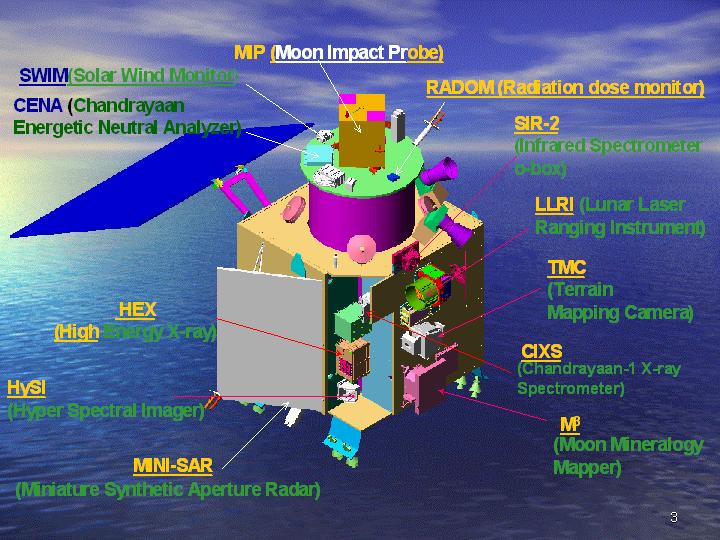
The heating problem on the craft had begun as early as November 25, 2008, forcing ISRO to deactivate some of the payloads - there were 11 in all. As a result, some of the experiments could not be carried out.
In early 2009, the situation improved and Chandrayaan-1 started operating normally. However, this time two star sensors got problem because of high temperature. These sensors were crucial in determining the orientation of the craft in space. The first star sensor packed up on April 26, and even the back-up sensor failed during the second week of May.
On August 29, 2009, ISRO lost radio contact of Chandrayaan-1. At the end, the mission was terminated on August 30, 2009 by the officials of ISRO.
Despite failure, Chandrayaan-1 has accomplished 95% result. Other countries are also satisfied with the result of mission Chandrayaan-1. The mission Chandryaan-1 is helpful for the Chandrayaan-2. Its strength and weakness is guidelines for Chandrayaan-2.

Java portlets started to become popular after the first version of the Java Portlet Specification, the Java Specification Request (JSR) 168, was finished in 2003 at the Java Community Processes. Since then, nearly all the vendors in the Java portal space, both commercial and open-source vendors, have implemented this standard, and developers have written portlets using the Java Portlet API.The JSR 168, however, stopped at defining the overall UI component model and did not define any means for building integrated composite applications out of these components. This limitation, and many other things that didn't make it into V1.0 due to time constraints, is now addressed in V2.0.Work on JSR 286 started in January 2006, and the final version was submitted in February 2008.Please go through the following links to get yourself more familiar with JSR 286 features and specifications:
http://www.ibm.com/developerworks/websphere/library/techarticles/0803_hepper/0803_hepper.html
http://www.ibm.com/developerworks/websphere/library/techarticles/0809_hepper/0809_hepper.html
(The second link also provides you some of the recommendations to consider while developing JSR 286 Portlets).
Broadly speaking, JSR 286 (or v2.0) has the following key points:
This backward compatibility statement also includes the deployment descriptor in which V2.0 added new entries, but did not change existing ones. This behavior means that you can turn most JSR 168 portlets into a JSR 286 portlet by changing the one line in the portlet deployment descriptor that references the schema to the new V2.0 portlet deployment descriptor schema.


 5. Introduction Portlet Filters & features
The Java Portlet Specification has introduced concept of Portlet Filters based on Servlet Filters. The basic concept remains the same that Portlet Filter allows you to do some pre and/or post processing for every request. Note one important point that unlike servlets, portlet specification defines 4 different phases for handling user request and as result it defines 4 Filter interfaces that you can use.
A portlet filter is a Java component that can be used to modify portlet request and response before/after any lifecycle method of the portlet is being executed. The concept of Portlet filter is same as that of servlet filter. The only difference is that a servlet has only one request handling method i.e. service() method and therefore there is only one type of the servlet filter. A portlet has four types of request handling methods and therefore there are 4 different types of portlet filters. The portlet API defines following interfaces for creating Portlet filter:
Each of the above filter interface contains a single doFilter (*Request, *Response, FilterChain chain) method which differs in the type of request and response object. For example, doFilter () method in ActionFilter takes ActionRequest and ActionResponse while doFilter () method of RenderFilter takes RenderRequest and RenderResponse objects. Each of the above filter interfaces extends a common base interface called javax.portlet.filter.PortletFilter. This common base interface contains init (javax.portlet.filter.FilterConfig filterConfig) and destroy () methods. The init (...) method makes sure that every Filter has access to a FilterConfig object from which it can obtain its initialization parameters, a reference to the PortletContext which it can use, for example, to load resources needed for filtering tasks. The init () and destroy () methods of a portlet filter are being called only once during their lifetime.
A single filter class can provide filter functionality for more than one lifecycle methods and also a single filter can provide filter functionality for more than one portlet. There can be multiple filters associated with one lifecycle method of a portlet. The javax.portlet.filter.FilterChain class (created by Portlet container) is used to invoke the sequence of filters applicable for a particular lifecycle method of a portlet. The doFilter () method of a portlet filter may create customized request and response objects by using *RequestWrapper and *ResponseWrapper classes and passing these wrappers to the doFilter () method of FilterChain.
In order to write a portlet filter, the developer is required to do the following 2 things:
 The first xml fragment defines a filter by providing a logical name to it. It tell portlet container about the filter class and the lifecycle phases supported by it. You can specify initialization parameters also.
The Second xml fragment specifies the portlet(s) for which this filter will be applicable. You can specify a single portlet name or mapping to a group of portlets using the ‘*’ as a wildcard.
6. JSR 286 - Public Render Parameters
In JSR 168, the render parameters set in processAction method is only available in the render of the same portlet.With the Public Render Parameters feature, the render parameters set in the processAction method of one portlet will be available in render of other portlets also. Using public render parameters instead of events avoids the additional process event call.[GL] In order to allow coordination of render parameters with other portlets, within the same portlet application or across portlet applications, the portlet can declare public render parameters in its deployment descriptor using the public-render-parameter element in the portlet application section. Public render parameters can be viewed and changed by other portlets or components.In the portlet section each portlet can specify the public render parameters it would like to share via the supported-public-render-parameter element. The supported-public-render-parameter element must reference the identifier of a public render parameter defined in the portlet application section in a public-render-parameter element.In the code, the portlets should use the defined public render parameter identifier to access the public render parameter [GL]. Rational Application Developer 7.5 (RAD) Portal Toolkit has inbuilt support for public render parameter declarations and usage, hence you will not have to code or modify the deployment descriptor the way shown down below in example[GL].
Steps to create a portlet with the Render parameters:
Coordination aka Inter-Portlet Communication


In most cases, portlets are self-contained and do not effect each other. Such portlets can be added/removed at will without affecting other portlets on a page. This decoupled nature makes portlet development and deployment easy. But the down side is that, for the end user, the UI looks less interesting. Silos are not the best way to present UI in a browser.
The JSR-286 and WSRP 2.0 specifications allow an exception to this. These specifications add ability for portlets to communicate with each other in a loosely-coupled manner. One of the key mechanisms for doing this is by using events. Events are named, and can optionally have a payload with them. Using this mechanism, based on some user interaction, one portlet could fire an event that other portlets can handle. Upon handling the event, those portlets can fire more events, and the chain can continue until some system limit occurs. In this model, portlets don’t send events directly to each other, and the portal acts as a coordinator for event distribution. During event processing, portlets can change their own state (e.g. change some back-end data). After the event chain completes, the portal renders each portlet with their latest state. In this way, portlets can still remain loosely coupled, and yet influence each other. In essence, events make it possible for a user interaction with one portlet to change the view of not just the portlet that the user is interacting with, but other portlets on a portal page as well. In some cases, the portal itself may want to handle some events, and its own markup may change.
Here is an example. Let’s say, a portal page is aggregating two portlets, viz. A and B. A submits an XMLHttpRequest to the server, which then invokes portlet A. As part of processing the request, A fires an event that B can handle. The portal dispatches the event to B. A then generates some JSON data to be returned via the responseText field of the XMLHttpRequest. While processing the event, portlet B changes its state, and its view in the browser becomes stale. The portal then needs to render B as well, and update its UI in the browser.
 Portlet A’s script that started the XMLHttpRequest does not know much about portlet B, and hence the portal can not simply return portlet A’s JSON data and portlet B’s HTML view in the same response to portlet A. It needs do something special. Again, the XMLPortletRequest interface is designed to solve this problem such that (a) portlet A can receive its JSON data, and (b) the portal can update portlet B’s view independently. The approach is not limited to events. Depending on how the portal is implemented and the features it supports, it can update any part of the portal page when several fragments of a page need to be updated in response to a portlet are XMLHttpRequest.
XMLPortletRequest is a script interface, i.e. it is possible to implement this interface in JavaScript. This is unlike XMLHttpRequest which can only be implemented by browsers natively. Except for its name, XMLPortletRequest shares the same syntax and semantics with XMLHttpRequest. If a portlet wants to synchronously or asynchronously update its UI either through an action or a render URL, it would simply use XMLPortletRequest in stead of the XMLHttpRequest. Where as browsers implement the XMLHttpRequest interface, portals and similar aggregating applications implement the XMLPortletRequest interface, typically as a layer on top of the XMLHttpRequest.
Here is the XMLPortletRequest interface:
 Wrapping XMLHttpRequest:
Note that the XMLPortletRequest can be implemented as a wrapper over XMLHttpRequest, and portals provide an implementation of the XMLPortletRequest. This gives the portal a chance to intercept both requests and response. It also gives portals a chance to ferry additional portal-specific data along with each request and response, and that is the key feature of the XMLPortletRequest. See figure below.
 In the above, the XMLPortletRequest is implemented using XMLHttpRequest. When a portlet’s script submits an XMLPortletRequest, the implementation makes a request to the portal on behalf of the portlet. This request could contain any implementation specific data. The portal then wraps the portlet’s response (which in this case is some JSON data) in its own response payload and returns it to its implementation in the browser. The XMLPortletRequest implementation can then return portlet’s response to the portlet via its responseText or responseXML fields. In this process, it can also update other parts of the page, including UI generated by other portlets. That is the advantage of wrapping XMLHttpRequest with a semantically equivalent interface.
Click here to View more...
There is a tag library that contains tags for JavaServer Faces components used in Portal enviornment. These components are *not* part of the standard JavaServer Faces Specification. All JSF tags in a portlet should be embedded with this tag if multiple instances of the same portlet can exist within a portal page.
Usage:
<%@ taglib uri="http://java.sun.com/jsf/html" prefix="h" %>
<%@ taglib uri="http://java.sun.com/jsf/core" prefix="f" %>
<%@ taglib uri="http://java.sun.com/jsf/portlet/components" prefix="p" %>
<%-- Embed JSF tags with in portletPage tag if you expect multiple instances of this portlet to exist within a portal page --%>
<f:view>
<p:portletPage>
.....................
.....................
</p:portletPage>
</f:view>
Click here to View more...
I have got lot of queries about the variables to be used in JSP page when included from within a Portlet. Also few problems were reported that the new variables introduced in JSR 286 are not working as expected. Let me explain both.
In order to use the variables you must refer to a different taglib uri and use defineObject Tag in the JSP page as follows
<%@ taglib uri=”http://java.sun.com/portlet_2_0” prefix=”portlet”%>
When the Java Portlet Specification( draft was released last year, i had written a blog on Public Render Parameter feature. Recently the proposed final draft was released, it has some changes in public render parameter feature. In this blog i will explain the feature with an example.
In JSR 168, the render parameters set in processAction is only available in the render of the same portlet.
With the Public Render Parameters feature, the render parameters set in the processAction of one portlet will be available in render of other portlets also. Using public render parameters instead of events avoids the additional process event call.
In order to allow coordination of render parameters with other portlets, within the same portlet application or across portlet applications, the portlet can declare public render parameters in its deployment descriptor using the public-render-parameter element in the portlet application section. Public render parameters can be viewed and changed by other portlets or components.
In the portlet section each portlet can specify the public render parameters it would like to share via the supported-public-render-
IBM Portlet allows to methods for inter portlet communication:
I have created some portlets that implement both methods of communication and going to try to share the main points to communicate portlets using these methods.
IDE
Shared render parameters
From Portlet
Photos of Ganpati Visarjan / Ganesha immersion on the day of Anant Chaturdashi at Girgaum chaupati, Mumbai. Sarvajanik Mandals of mumbai bringing Ganesha idols at Girgaum chaupati.
Ganpati Visarjan / Ganesha Immersion photo at Girgaum chowpati 01
Ganpati Visarjan / Ganesha Immersion photo at Girgaum chowpati 02
Ganpati Visarjan / Ganesha Immersion photo at Girgaum chowpati 03
Ganpati Visarjan / Ganesha Immersion photo at Girgaum chowpati 04
Ganpati Visarjan / Ganesha Immersion photo at Girgaum chowpati 05
Ganpati Visarjan / Ganesha Immersion photo at Girgaum chowpati 06
Ganpati Visarjan / Ganesha Immersion photo at Girgaum chowpati 07
Ganpati Visarjan / Ganesha Immersion photo at Girgaum chowpati 08
Ganpati Visarjan / Ganesha Immersion photo at Girgaum chowpati 09
Ganpati Visarjan / Ganesha Immersion photo at Girgaum chowpati 10
Ganpati Visarjan / Ganesha Immersion photo at Girgaum chowpati 11
Ganpati Visarjan / Ganesha Immersion photo at Girgaum chowpati 12
Ganpati Visarjan / Ganesha Immersion photo at Girgaum chowpati 13
Ganpati Visarjan / Ganesha Immersion photo at Girgaum chowpati 14
Ganpati Visarjan / Ganesha Immersion photo at Girgaum chowpati 15
Ganpati Visarjan / Ganesha Immersion photo at Girgaum chowpati 16
Ganpati Visarjan / Ganesha Immersion photo at Girgaum chowpati 17
Ganpati Visarjan / Ganesha Immersion photo at Girgaum chowpati 18
Ganpati Visarjan / Ganesha Immersion photo at Girgaum chowpati 19
Ganpati Visarjan / Ganesha Immersion photo at Girgaum chowpati 20
Ganpati Visarjan / Ganesha Immersion photo at Girgaum chowpati 21
Ganpati Visarjan / Ganesha Immersion photo at Girgaum chowpati 22
Ganpati Visarjan / Ganesha Immersion photo at Girgaum chowpati 23
Ganpati Visarjan / Ganesha Immersion photo at Girgaum chowpati 24
Ganpati Visarjan / Ganesha Immersion photo at Girgaum chowpati 25
Ganpati Visarjan / Ganesha Immersion photo at Girgaum chowpati 26
Ganpati Visarjan / Ganesha Immersion photo at Girgaum chowpati 27
Ganpati Visarjan / Ganesha Immersion photo at Girgaum chowpati 28
Ganpati Visarjan / Ganesha Immersion photo at Girgaum chowpati 29
Ganpati Visarjan / Ganesha Immersion photo at Girgaum chowpati 30